
I’ve covered Winhanced quite a few times at this point, most recently when it added achievement support to the launcher UI for Steam, Xbox, and even PlayStation games. If you haven’t heard of it, Winhanced is a complete replacement for Xbox Mode on Windows handhelds, acting as a unified launcher for your library across various digital stores, all in one easy-to-navigate interface.
Now, its feature set is expanding once again, bringing with it my most requested addition: a built-in store browser. Honestly, it’s something I wasn’t even sure was possible, but it’s now available in testing for users supporting the project.
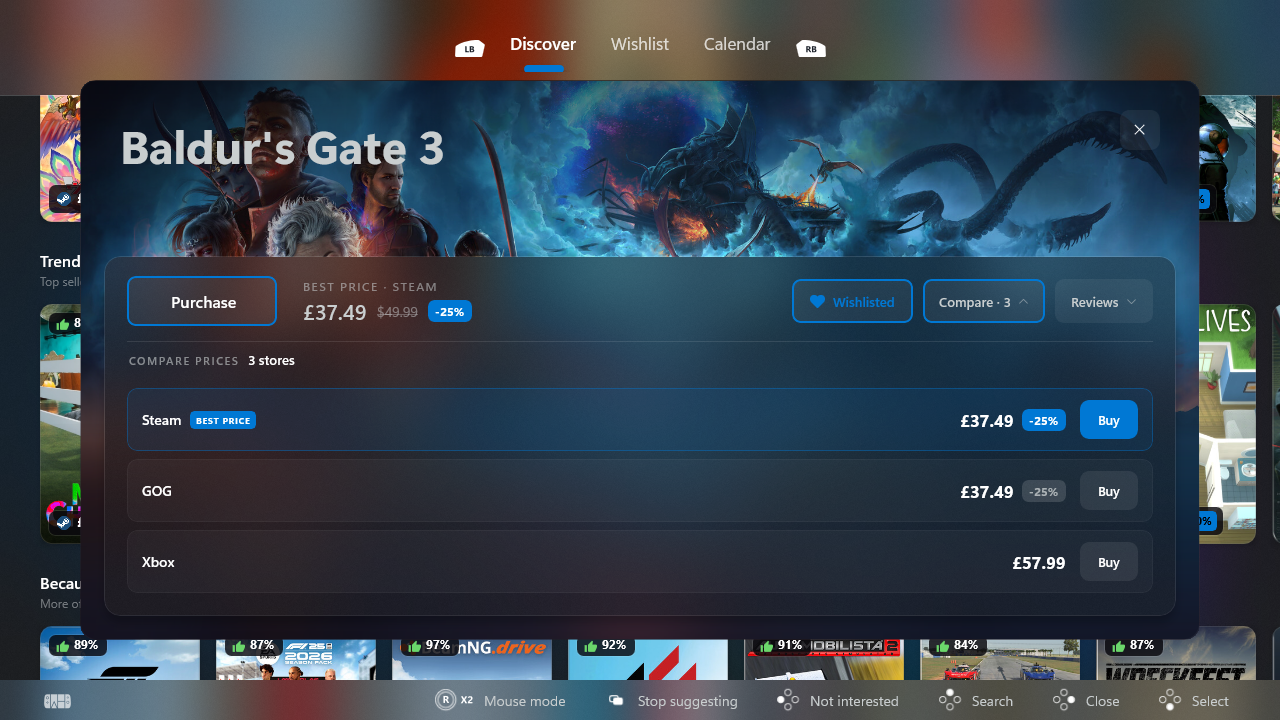
The store is still very much a work in progress, so don’t expect a perfect experience. At the time of writing it only supports certain currencies, although regional currency support is on the way, but even in its current state it’s already incredibly useful. You can browse games, compare prices across multiple storefronts, see if a title is included with Game Pass, and purchase it from whichever store offers the best deal.
So yes, if a game is cheaper on Xbox than Steam, you can simply buy it there instead. It is also worth mentioning that when you purchase games, it opens a web browser where you can complete your purchase; Winhanced does not have access to your payment details.
The launcher also personalizes recommendations, generating suggestions based on what you’ve been playing, and in my case, after spending plenty of time in Forza Horizon 6, it immediately recommended another racing game. If you’d rather browse for yourself, though, you can search for any game you like or explore categories to discover something new.
Winhanced is also bringing several features out of early access, including back paddle support, SteamGridDB artwork browsing, and RGB controls, meaning they’re now considered ready for general use rather than experimental additions.
I’ve been a big fan of Winhanced for quite some time now. It makes my Xbox Ally X feel much more like a proper console than the Xbox app ever has in Xbox Mode, so if you’re interested, I’d definitely recommend checking out the project’s Discord and supporting it on Patreon if you can.
With that said, do let me know in the comments if this new store feature is finally enough to get you interested in giving Winhanced a try, or what other features you’d still like to see added. As always, be sure to take part in our poll below!

Join us on Reddit at r/WindowsCentral to share your insights and discuss our latest news, reviews, and more.