


Sony has quietly activated a new PSN privacy setting for messages that players might want to turn off. Sometime recently, PlayStation introduced a “read receipts” feature for messages exchanged over PSN, which is automatically turned on for all users.
Sony quietly activated a new PSN messages setting without notice
I rarely ever use PSN messages, so it wasn’t until today that I noticed the new read receipts feature while updating the PS App. I then checked my privacy settings to see if there was a way to turn them off, and noticed that read receipts were turned on by default.
I certainly didn’t turn them on myself, and found the default setting a little intrusive.
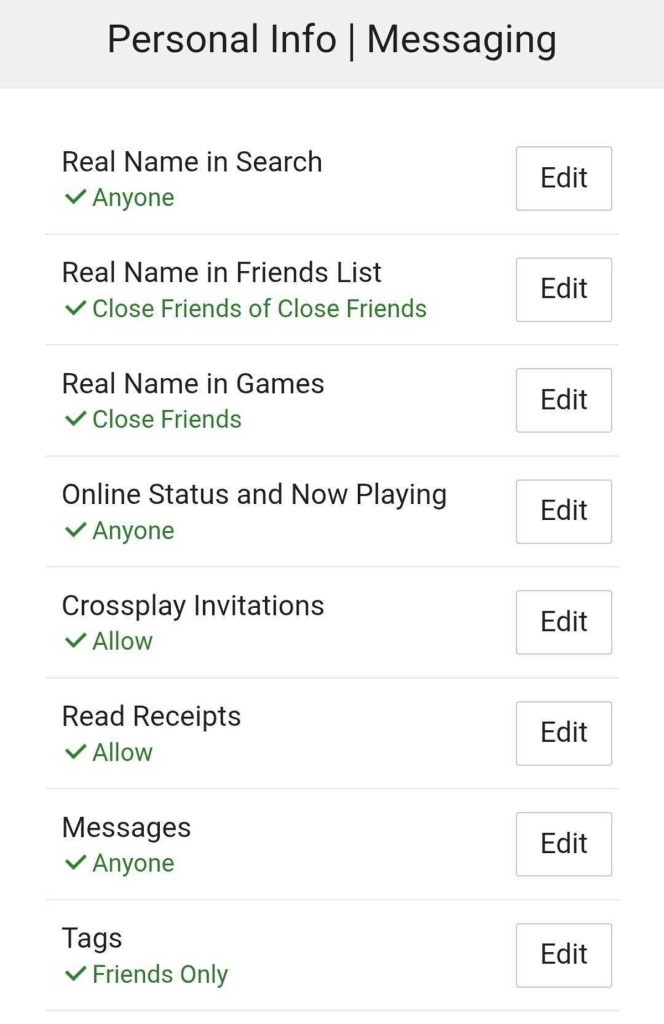
If you’re using the PS App, turning off read receipts is a simple process. When signed in, hit the settings cog on the top right corner, scroll down to PlayStation Network, and select Privacy Settings (note: you might be required to enter your password again).
Select Personal Info | Messaging, and you’ll see the screen pictured above. Select the Edit option next to Read Receipts and hit “Don’t Allow.”
If you choose to allow read receipts, a “Read” label will appear under messages that you’ve received and read, allowing the sender to see their message has been seen.
If you play multiplayer games and keep your messages open to communicate with other players, I advise turning read receipts off, especially if you run into toxic players.
The post PSN Has a New Privacy Setting That You Might Want to Turn Off appeared first on PlayStation LifeStyle.

Thanks for sharing this update! It’s always good to stay informed about privacy settings, especially with gaming accounts. Adjusting these features can really enhance our experience.
You’re welcome! It’s definitely important to keep an eye on these changes. It’s interesting to note how privacy settings can impact player interactions, especially in a community-driven environment like PSN.