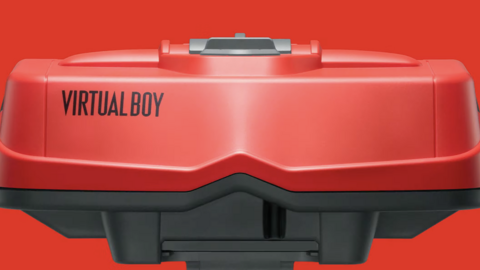

Nintendo doesn’t have very many high-profile missteps, which makes it all the more notorious when one of its flagship products falters. The Wii U is the most recent example, but before that the all-timer was the Virtual Boy–a mid-’90s experiment in early 3D effects that never caught on. Nintendo fans have identified many possible causes for this–the unwieldy design, the all-red graphics, the middling library–but whatever the cause, it’s been a sore spot in Nintendo history. Now the company is bringing it back with emulation and two accessory options (one or the other is required) on the Switch 2. It works well, but will likely serve more as a museum piece for fans of Nintendo history than a strong part of the gaming library.
During a Nintendo event, we were able to try the Virtual Boy emulation, with a Switch 2 console fitted into the pricey Virtual Boy accessory. (The cardboard model was on display behind glass, but we weren’t able to try it.) The $100 option looks just like my memory of a Virtual Boy in a Toys R Us kiosk, complete with its tripod stand and foam face shield. The only major differences are that this one has a Switch 2 noticeably lodged into it, and there is no attached controller since you’ll just use paired Joy-Cons or Pro Controller. It was notable, more as an interesting curiosity than anything else, that about half of the Switch console was actually sticking out of the bottom of the Virtual Boy accessory. The actual Virtual Boy display was only utilizing roughly the top half of the screen.
Then there’s the experience of actually putting hands (and eyes) on it. The foam face shield was actually very comfortable and did a great job blocking out the ambient light of the room. Hunching over to get my eyes in the correct position was less comfortable, but I learned afterwards that I would have been allowed to adjust the table height on request, so that may just be user error on my part. Still, it does raise the specter of one key weakness of the Virtual Boy: You have to find a position to play and stay planted there, rather than naturally shift around as people tend to do when relaxing with a video game. The field-of-view was slightly odd, also, as I had to lift my head up above the face shield slightly and look down “into” the display to see the part of the UI that explained the suspend menu shortcut. And of course, the red-and-black display does still feel fairly harsh, and emerging from the darkened cocoon of the Virtual Boy display is disorienting.