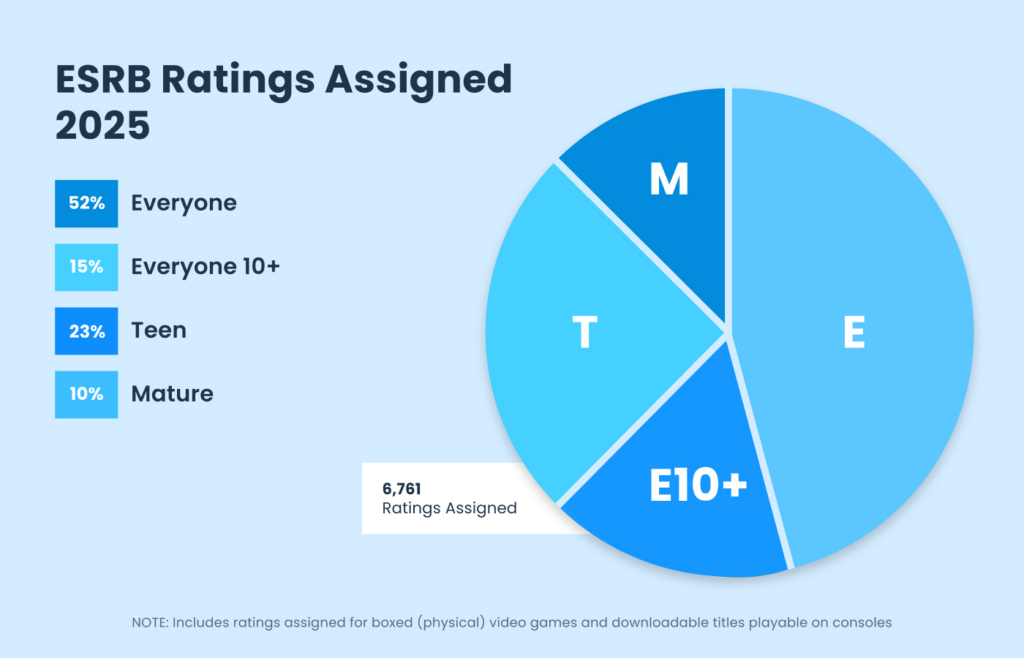

Like literally every year in the past, E for Everyone is the most assigned Rating Category for physical and console downloadable games in 2025. Not only that, but last year E for Everyone accounted for more than 50% of the more than 6,500 ratings assigned.
Read on for more about our Rating Category stats from 2025.
E (Everyone)
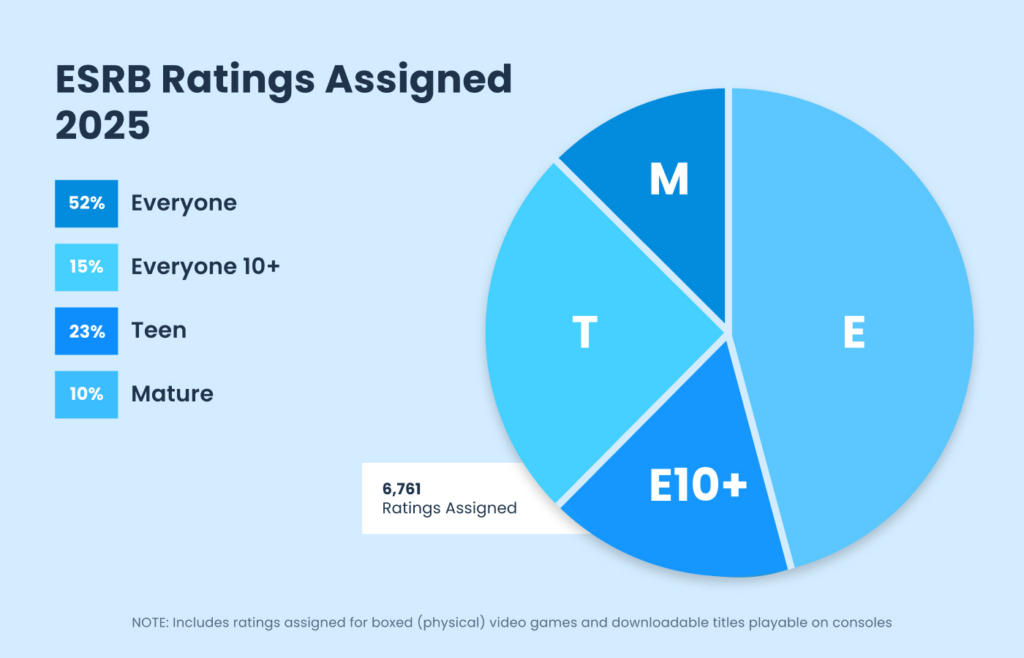
52% of all ratings assigned to physical and console downloadable games in 2025 were rated E for Everyone. This means that more than 3,500 games rated in 2025, including many of the most popular ones, are appropriate for the whole family!
E10+ (Everyone 10+)
ESRB assigned Everyone 10+ to 15% of the games rated in 2025. This means about 67% of the games released (or rereleased) throughout the year may be appropriate for your 10-year-old!
T (Teen 13+)
Just like in 2024, 23% of the games rated last year were assigned T for Teen in 2025. This amounts to more than 1,550 physical and console downloadable games. Combined with E for Everyone and Everyone 10+, this means that 9 out of every 10 games rated in 2025 were appropriate for your 13-year-old!
M (Mature 17+)
M for Mature is historically the least frequently assigned rating category, and 2025 continued that trend. ESRB assigned 10% of the physical and console downloadable games and M for Mature rating. This is 2% lower than 2024, and the lowest percentage since 2019.
Managing Your Kids’ Video Game Experiences
Checking the ratings is a great first step to help decide if a game is appropriate for your family. Sometimes the ESRB-assigned rating information is all you’ll need, but if you’re still on the fence there are many resources readily available to find more information.
- Check all three parts of the rating – Parents tell us that all three parts of the ESRB rating system are important so don’t forget to check a game’s Content Descriptors and Interactive Elements. Content Descriptors provide additional information about what led to a game’s age rating, such as language, violence, humor, and more. Interactive Elements let you know when a game has the ability for players to communicate via voice chat, text, user generated content, and more.
- Check the Rating Summary – Physical games all have Rating Summaries that provide more detailed information about what led to a rating assignment. You can find these by searching for a game on ESRB.org or the ESRB App (for Android and iOS).
- Visit ESRB’s Family Gaming Guide – For more information about picking appropriate games, maintaining your kids’ online privacy, managing screen time, and more, ESRB’s Family Gaming Guide has you covered.
- Additional research – Any game that your kids may be clamoring for will have some video available to watch online. This may come in the form of a trailer, gameplay videos, “let’s plays” with streamers, and more. Websites like YouTube and Twitch can be a great resource to learn more about a game before purchasing or downloading for your kids. And we always recommend that you play games with your kids, which is a great way to better appreciate their experiences…and have a great time.
- Set parental controls – Virtually all video game devices include the ability to activate parental controls. These give you the ability to manage which games your kids play based on the rating, when and for how long they can play, whether they can communicate online with others, and how much money they can spend (if any!) on new games or in-game purchases. ESRB provides free, step-by-step parental controls guides here.
And remember: ESRB ratings are here to suggest the age-appropriateness of a game. There can still be games that are too complex or challenging for your younger kids, regardless of their ratings. So, double-check with a few minutes of additional research to make sure your family has as much fun as possible with their next video game, including playing games together as a family
The post Rating Category Breakdown: 90% of Games Rated in 2025 Are Age-Appropriate for Your 13-Year-Old appeared first on ESRB Ratings.