
There’s five connected regions in Pokémon Pokopia for you to rebuild and make new homes for hundreds of Pokémon, but running back and forth between them can get to be a bit of a chore, so does Pokémon Pokopia have fast travel? Yes, it does!
How do you Fast Travel in Pokémon Pokopia?
You won’t see an interactive world map in Pokémon Pokopia or a ‘Fast Travel’ label, but you can still effectively teleport yourself between regions. The key is that you need to have built and chosen a home for Ditto in each region, allowing you to jump between them more quickly.
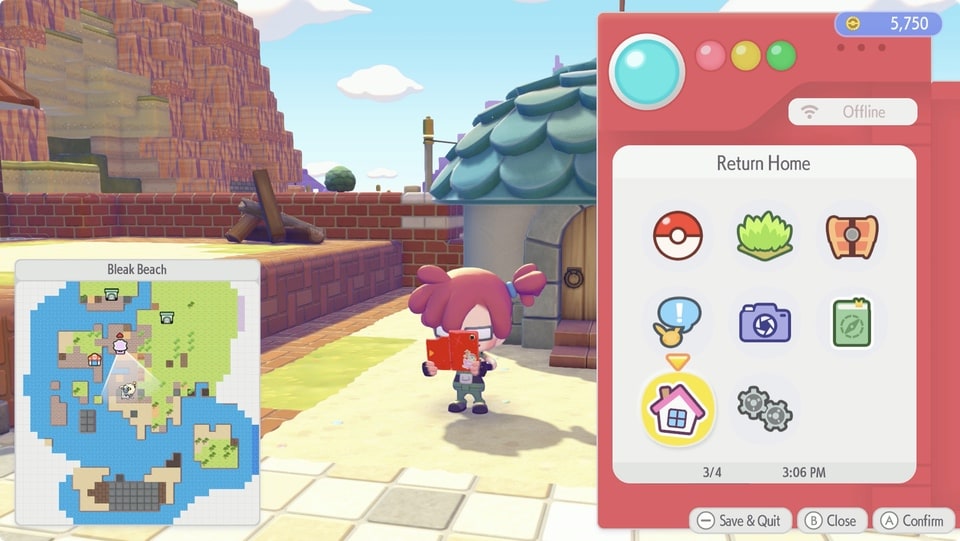
If you have a home in another region, you can hit + to bring up the Pokedex menu, then select the house icon in the bottom left of the menu, labelled as ‘Return Home’. This lets you choose from your available homes to return to. Just know that if you don’t have a home in the region that you are leaving, then you’ll have to come back through one of the standard routes.

Mark your home with a Ditto Flag
Picking a home for Ditto is pretty straightforward, and it’s one of the early projects that Prof. Tangrowth with set for you in the opening Withered Wasteland region. You’ll build a home, place three items of furniture inside, and then plant a Ditto flag on it.
In other regions, you’re free to choose your own path. On Bleak Beach, for example, there are some still intact homes that you can adopt by placing a Ditto Flag nearby. You just need to use a crafting workbench to make a Ditto Flag – you need one sturdy twig, one twine and one Leppa Berry – and then plant it on home.

Can Ditto have housemates?
Want to live with your favourite Pokémon? If a building or block house is big enough, then you can invite other Pokémon to live with Ditto. You’ll see how many Pokémon a home can support indicated when you’re close by, and just need to ask a Pokémon to follow you, bring them to the home you want them to live in, and ask them if they want to live there. Make sure that it’s a nice place that meets their preferences, though!

Building homes in Pokémon Pokopia
There’s actually two types of building that Ditto and the other Pokémon can live in. You can construct a building using a building template, gathering the resources and then asking a team of Pokémon to put it all together, and these can have bespoke interior screens (a bit like entering a home in the classic Pokémon games). Alternatively, you can make a house out of material blocks.

To make a block house, you just need to enclose a space with four walls, a door, and then place three different furniture pieces inside. Aside from that you have total freedom. Roof or no roof? How many windows? Multiple rooms and floors? It’s up to you!
More Pokémon Pokopia Guides and Features
Check out these other guides and features for Pokémon Pokopia:
- Pokémon Pokopia Review
- Can you play Pokémon Pokopia on Switch 1? Only with GameShare
- Learn how to jump in Pokémon Pokopia
- Surf’s up! – How to swim in Pokémon Pokopia and find Lapras
- The Glide Guide – How to fly in Pokémon Pokopia and find Dragonite
- You’ll never guess where to learn Waterfall in Pokémon Pokopia