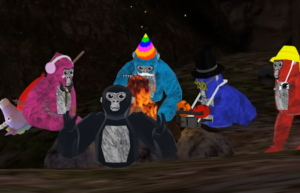

Any parent or teacher with kids under the age of 14 are probably already aware, but millions of young gamers are hurtling headfirst into Gorilla Tag, an online, multiplayer VR game with constantly changing game modes. Are your kids ready to become a “monke” (the name for in-game characters) and engage in fast-paced, physical tag? Read on to find out.
Is Gorilla Tag Appropriate for Kids?
Gorilla Tag is rated E for Everyone with a Content Descriptor for Mild Fantasy Violence. The rating for Gorilla Tag also includes two Interactive Elements: Users Interact (meaning players can communicate through the game) and In-Game Purchases (meaning users can use real money to purchase virtual currency that can be used to purchase in-game content).
In its most basic form, Gorilla Tag is a cartoony, heightened game of virtual tag. However, according to the ESRB assigned Rating Summary, “monkes” can use “slingshots or cartoony bows-and-arrows to damage combatants,” which is obviously quite different than traditional tag. Damage is displayed visually in tame ways, such as popped balloons or characters slowing down.
Even if the content sounds appropriate, remember that Gorilla Tag is a VR game. Most VR headset manufacturers recommend that headsets be used only when kids are 13 or older. Meta has options for parent-managed and supervised accounts, and Gorilla Tag uses those features in-game by restricting users’ ages. Gorilla Tag uses k-ID age verification to determine a player’s age and, where appropriate, require parental consent before granting access to communication features, social interactions, and certain in-game purchase options. Younger players may require parent or guardian involvement during verification. These measures all help to make sure your kids’ information stays private and ensure that you (as the parent and decision-maker) are involved in and aware of your kids’ video game experiences.
It’s a good idea to check the user manual for any VR headset you own to also see if there are any recommended age restrictions. Of course, the final decision is always up to you!
Where Can I Play Gorilla Tag and How Much Does it Cost?
Gorilla Tag is a free-to-play VR game available on PlayStation VR2, Meta Quest 2, Meta Quest 3, and Meta Quest Pro. It can also be purchased through Steam for $19.99 to play on PC VR. Five “monkes” sit by a campfire in a game of Gorilla Tag.
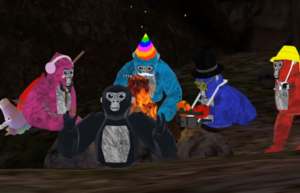
On most platforms Gorilla Tag doesn’t cost anything to download and play, but it does include offers for users to purchase in-game cosmetics. These include things like hats, sunglasses or makeup, clothing, gloves, held items, and more.
Cosmetics are exchanged for the in-game currency, called Shiny Rocks. Players have the option to purchase Shiny Rocks from an in-game ATM. Players can purchase Shiny Rocks through various bundles, typically priced between $5 and $40, with available options subject to change.
As with most free-to-play games, in-game purchases are entirely optional. Even if you and your family do not want to spend money on Shiny Rocks, players earn 100 Shiny Rocks when they log in each day. It’s always a good idea to discuss your household rules around in-game purchases with your kids, and back them up with parental controls (more on that later!).
How Does Gorilla Tag Play?
Gorilla Tag includes several game modes with the core mechanic being to avoid a tagger. From a first-person perspective, players move by pumping their arms (like a running gorilla!) to run, climb, and jump through the environment.
Infection
Gorilla Tag’s default game mode drops at least 4 players (and up to 10 players) into a level with one monke being chosen at random as infected. The infected monke, also known as the “lava monke,” must chase the other players in an effort to tag them. However, unlike real tag, instead of being “out,” the tagged monkes are also infected and will join the original lava monke in hunting down the uninfected players. The game ends when everyone gets tagged, at which point a new game starts with a new lava monke. In addition to Infection as the core mode, Gorilla Tag offers newer modes and experiences, including Ranked Mode, community-created maps through Share My Blocks, and updated hub areas like Hoverpark.
Hunt
A four-player mode that gives each player a “target” to hunt. Once the game begins, each player is given a hunt watch that displays information about their unique target (one of the other players). This includes things like the color of the monke, the player’s username, cosmetic information, and more. Players will then try to tag their target – which is kept secret from other players – while simultaneously trying to avoid the player hunting them. When tagged, players become an “ice monke” who can tag other players, slowing down their run speed and making it easier for their pursuer to catch them. The game ends when there are only two hunters left.
As with most free-to-play games, in-game purchases are entirely optional.
Paintbrawl
Monkes start this game on a team of either orange or blue. Each monke is given a slingshot with paintballs to fling at the monkes on the other team. Each monke can be hit three times before getting out – this is visually represented by three balloons floating on each monke’s back. When a monke loses all of their balloons they are no longer able to pop their opponent’s balloons, but they can continue to use their slingshots to fatigue and slow down their adversaries. The game ends when all the monkes on a team lose their balloons.
Casual
This is a non-competitive game mode to chat with friends outside of the regular gameplay. There are no core objectives, and players can simply communicate via voice chat (if you permit that) with friends and others.
The Share My Blocks feature enables players to access custom, community-created maps, indicating that some in-game content is user-generated. Additionally, Gorilla Tag regularly introduces seasonal maps and events, such as winter, holiday, or themed updates, which change environments and activities throughout the year.
Managing Your Monkes Like a Pro
VR can be a new and exciting place for kids to play, especially when it has the added benefit of being a very physically active and social game like Gorilla Tag. In 2025, Gorilla Tag even added an in-game friending system, allowing players to add friends directly within the game without relying on external platforms. This is part of why it’s so important to stay looped into your kids’ video game interests, and to work with them to make sure they’re monke-ing around in an appropriate environment.
Checking the ESRB-assigned rating information is always a great first step. But there’s no better way to understand a game than trying it out for yourself. But there’s no better way to understand a game than trying it out for yourself. Of course, doing a little bit of research – especially watching videos and streams – can give you a great idea of what a game is all about.
Setting household rules is also a great way to keep an ongoing, judgement-free conversation around video games active in your home. You can find some tips about starting that talk by visiting our Family Gaming Guide.
Setting parental controls, which can apply at the account level and affect communication features and purchasing access based on a player’s age and verification status, is a great way to support your household rules. On Meta Quest, parents can enable dedicated child accounts for kids ages 10 to 12 and supervision settings for teens age 13 and up. These tools activate automatic restrictions in Gorilla Tag for features like voice chat, social interaction, and spending.
This is also true for PlayStation VR2, which requires a PlayStation 5 to play. These settings allow you to manage what your kids play, when and for how long, with whom, and whether they can spend real world currency on in-game purchases (or other new games). You can find step-by-step parental controls guides at ParentalTools.org.
The post A Parent’s Guide to Gorilla Tag appeared first on ESRB Ratings.