

Despite being one of the studios affected by Xbox’s company-wide “Reset” and Xbox CEO Asha Sharma taking direct control of Minecraft with the goal of helping it compete with Roblox, Mojang Studios appears to be still going strong, as it has released a new update for its iconic survival-crafting game.
This update, titled Preview 26.40.30, is bringing with it a slew of gameplay changes, bug fixes, and a couple of new in-game items that felt like they should’ve been in Minecraft from the beginning: Cushions and a Straw Bed.
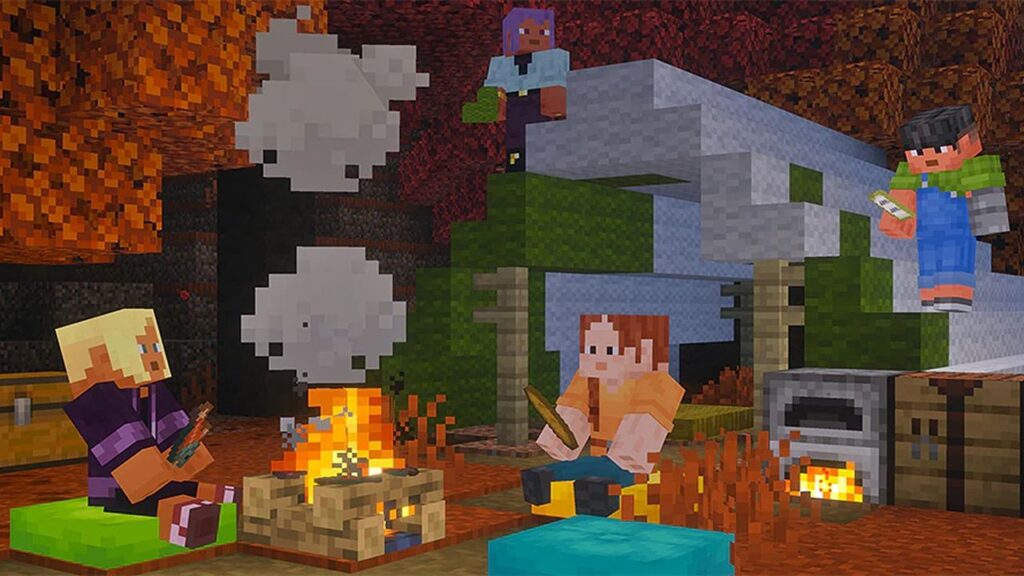
Cushions allow players to sit and rest after a long day’s adventuring and crafting. They don’t offer any statistical gameplay benefits but can make for fun roleplay toys when sitting by campfires or having sleepovers with your friends in co-op.
The Straw Beds are a new type of bed which players can sleep on to recover health without creating a new spawn point that overrides a previous one. This can be handy if you plan on adventuring but don’t want to respawn in the middle of a Creeper-infested cave and want to go back home when you die.
The materials needed to craft these items, along with the rest of this update’s gameplay changes, can be found in the patch notes below:
Click here to expand the full list ↴
Drop 3 Experimental Features
- Cushion
- The Cushion is an item that the player can place in the world and interact with to sit on
- Can be crafted in 16 colored variants
- Cushions are crafted using 3 Wool Slabs of the same color
- Known Issue: Cushions aren’t currently generating in the Abandoned Camps, but can be found in the creative inventory
- Cushion Placement Rules
- A cushion can be placed on any flat surface
- Cushions always align horizontally to the grid, but vertically sit on top of the supporting surface
- Cushions cannot move
- Cushions break if the supporting block is removed
- Cushions do not have collision and can overlap with other objects (except other cushions)
- Straw Bed
- Straw Bed is a new type of bed which can be used to sleep through the night without setting your spawn point
- It can only be used once and will be destroyed after use
- It can not be used in the Nether or The End and will be destroyed if you try to sleep on it there
- It is crafted using 3 Hay Bales and will give you 4 Straw Beds
- Abandoned Camp
- Abandoned camp now generates in Pale Garden and Flower Forest biomes (MCPE-230024) (MCPE-240045)
- Straw Beds can now be found in Abandoned Camps
- Updated Abandoned Camps to place procedural trees
- Fixed wrong potion names in the loot tables for the Abandoned Camp
- Dappled Forest
- Changed biome fog settings to match other forest biomes
- Updated Orange, Red & Yellow Poplar Leaves MERS textures
- Sounds
- Updated ambient sounds for Poplar leaf blocks
- Added custom sound events for Red Shrubs and Poplar leaf blocks
- Graphical
- Added opaque versions to the Poplar leaves to fix black background issue (MCPE-240020)
- Added hinges to Poplar door icon. Also removed 3 pixels from top door texture that didn’t match the palette
- Fixed Poplar sign texture to follow other sign assets
- Gameplay
- Added missing recipes for Wool Stairs and Wool Slabs (MCPE-240040)
Features and Bug Fixes
- Accessibility
- Fixed the focus indicator on the “More options” button on the start screen so it no longer relies on color alone, adding an underline when the button is focused
- Blocks
- Azalea and Flowering Azalea are no longer see-through when viewed from below (MCPE-217896)
- Brown and Red Mushrooms can no longer be placed under the sky when it is dark
- With the Minecraft Education features toggle enabled, it is possible to place charcoal again in the Lab Table (MCPE-240097)
- Fixed a miscolored pixel in one of the Sulfur Spike textures
- Gameplay
- Fixed an issue where structure loot would differ on the same seed (MCPE-239951)
- General
- Brown and Red Mushrooms now generate on Crimson Nylium and Warped Nylium no matter the brightness
- Graphical
- Fixed a rendering issue with Vibrant Visuals where some items and text could be invisible on certain Android GPUs
- Updated supported devices for Vibrant Visuals on Android
- Items
- Fixed issue where book and quill from pre-26.30 worlds freezes the game (MCPE-239753)
- Arrows of Harming no longer bounce off entities and are now correctly removed on hit (MCPE-239756)
- Character Creator
- Exiting the dressing room no longer automatically saves your character if you have an unequipped color change.
- Stability and Performance
- Fixed a crash that could occur when spawning more than one Iron Golem
- Game servers now attempt to self-repair some player connection issues
- Fixed a crash that could occur during world generation when placing structures containing double chests
- Fixed a potential crash issue related to Concrete Powder blocks converting into Concrete.
- User Interface
- Fixed a bug where text formatting codes in a resource pack’s name carried over into the rest of the toast notification when the pack was activated or deactivated (MCPE-182130)
- Add missing preview image for the Desert flatworld preset (MCPE-194395)
- Updated the network disconnection message to direct players to enable ‘Use Mobile Data’ in general settings instead of profile settings
- Fixed a bug where button touch areas did not align with the buttons in windowed Android modes with a title bar, such as Samsung DeX and pop up view.
- The Pause Game setting is now rendered in the Main Menu (MCPE-237101)
- Show “Game unpaused” notification over all screens when the pause screen is open (MCPE-229796)
- Fixed a soft-lock that prevented further join attempts after a party leader’s Experience join was blocked by the party eligibility check
- Fixed the “How to Play” button being missing from the Settings menu in Minecraft Education
- Fixed Cloud sync storage banner to not show redundant information that storage is both full and almost full when cloud storage is full (MCPE-240036)
- Fixed the Beacon screen displaying a duplicated header in the Pocket UI
- Create New World list is loaded correctly after deleting world data through the “Manage Worlds” button (MCPE-239804)
- Updated Nintendo Switch terminology for local wireless multiplayer
- Fixed a problem that caused touch scrolling to be unresponsive in creative inventory. (MCPE-236783)
- Fixed an issue that prevented splitscreen players from interacting with Game Settings. (MCPE-237830)
- Updated Marketplace badges to use semantic Tag styling for bordered and spacious variants, with refreshed Tag documentation and tests
- Fixed skin info button not working on expanded skin pack page
- After entering the sidebar while spinning the character, it will no longer continue to spin by itself
- Players with multiplayer-restricted skins can now enter worlds with multiplayer disabled
- Removed space appearing between the chat tab and the social drawer (MCPE-239456)
- Marketplace
- Updated Marketplace content cards with new pass and rating iconography, refreshed Minecoin visuals, and a notice badge treatment for surfaced states
- Storage
- Updated old world conversion flows in the Storage Settings tab.
Technical Updates
- Commands
- Allow self selection expansion when using commands (i.e. /tell) for non-operator players.
- Fixed clone command cloning partial beds, both parts must be fully inside cloning volume
- Fixed the /fill command from improperly placing blocks defined with the minecraft:multi_block trait
- Graphical
- Tightened the anti-x-ray trigger box to avoid false-positive cases when riding a mob
- Fixed custom blocks rendering a stray solid face that could bleed through textures when a model face was hidden by setting one of its UV size dimensions to zero
- Fixed texture bleeding on custom blocks using automatic block face UV assignment with undersized textures
- Actor Components
- Made schemas for the following components stricter when parsing and will fail to load an entity json that has invalid data in versions 1.26.40 and newer.
- minecraft:cannot_be_attacked
- minecraft:ignore_cannot_be_attacked
- minecraft:floats_in_liquid
- minecraft:wants_jockey
- Made schemas for the following components stricter when parsing and will fail to load an entity json that has invalid data in versions 1.26.40 and newer.
- AI Goals
- Fixed a bug where the on_kill event in the following behavior components was incorrectly mapped to the on_attack field, causing the event to never fire when an entity killed its target. The fix applies to entity definitions with format version 1.26.40 and above.
- minecraft:behavior.melee_attack
- minecraft:behavior.melee_box_attack
- minecraft:behavior.delayed_attack
- minecraft:behavior.stomp_attack
- minecraft:behavior.use_kinetic_weapon
- Fixed a bug where the on_kill event in the following behavior components was incorrectly mapped to the on_attack field, causing the event to never fire when an entity killed its target. The fix applies to entity definitions with format version 1.26.40 and above.
- API
- Fixed minecraft:hopper_minecart to fire EntityItemPickupAfterEvent and EntityItemPickupBeforeEvent for items above the cart.
- Released LootItem.conditions in @minecraft/server v2.4.0 (moved from beta to stable)
- DDUI
- Fixed Images in CustomForms not being centered in the form.
- Added ImageOptions.onClick and ImageOptions.tooltip which allow for a callback on click of an image and a tooltip on images, for use with CustomForm.image.
- Blocks
- N-way rotation on geometry components no longer requires upcoming creator features experiment
- minecraft:sixteen_way_rotation state on placement direction block trait no longer requires upcoming creator features experiment
- Align brightness sampling strategies between custom and vanilla blocks (MCPE-237493)
- Jigsaw Block replacement will now log when an invalid final_state is encountered
- Added new biome decoration feature “minecraft:multi_block_feature”, which can be used exclusively to place blocks defined with the “minecraft:multi_block” trait
- Released the minecraft:instrument_sound component from experimental.
- Crafting
- “minecraft:recipe_smithing_transform” now accepts items tagged with “minecraft:transform_materials” in its “addition” field
- Editor
- Fixed a bug where copying and pasting a double chest with the Paste Preview or Structure tool pasted it as two separate single chests instead of a single double chest
- The Block Inspector tool now highlights the currently selected block with a bounding box, giving a clear visual indicator of which block is being inspected
- Fixed the Primitives Tool preview and placement to follow the Fixed Distance cursor projection
- The Flood Tool no longer errors when pressing Ctrl+D to remove a preview that has already been removed
- Editor property pane items no longer display an empty tooltip when there is no tooltip text to show, such as the Flood Tool progress bar
- The Dimensions tool now returns the player to their last-known position in the target dimension, or the origin on first visit
- The Farm Generator tool now offers Pale Oak, Dark Oak, Nether Brick, and Mangrove fence options
- Fixed a bug in the Biome Data Assignment tool where the Allow biome tag list was matched with a logical AND, so only biomes containing every allowed tag were eligible; allowed tags are now matched with a logical OR, so a biome is eligible if it has any of the allowed tags
- Fixed a bug in the Vibrant Visuals color settings where dragging a timeline playhead no longer scrubbed the viewport time, so color and value keyframes could not be previewed across the day/night cycle
- Fixed a bug that caused the sliders connected to any Vibrant Visuals “Enabled” checkbox to be manipulated with the checkbox toggled off
- Fixed a bug that caused incorrect theme color to display for disabled text field
- Added a Timeline panel to the Cinematic Tool for visualizing and editing keyframes along the camera path
- Renamed “Control Points” to “Keyframes” throughout the Cinematic Tool to align with standard animation terminology
- Removed all transaction recording and management functionality from the TransactionManager API and moved it to the PendingTransaction object. Transactions are now created through createPendingTransaction function, while staged changes are finalized using the submit and discard methods
- Added pending transaction support for ClipboardItem.writeToWorld and BrushShapeManager APIs
- Added a drag handle to the cinematics timeline so the timeline duration can be adjusted directly in the editor
- Fixed a bug that caused placeholder string in text field to be incorrectly styled
- The Navigation panel’s minimap now uses the new minimap control
- World locations are now stored per-dimension and shared across all clients
- Lowered the Nether’s minimap scan Y-level so the map skips the bedrock ceiling
- Removed the “X” button from progress windows for the Custom Mesh, Primitive, and Flood tools
- Fixed a bug that appears in Layout Template Manager during ‘Copy Template’ operation when copying a template with structures. The template is copied along with name and display name. The fix is that the name and display name metadata are set from the caller.
- Fixed a bug where the custom cursor does not change from wait/load icon after canceling the flood operation
- Fixed a bug that caused Collection Tree UI element width to be incorrect
- Entity Components
- Made the should_bounce boolean field of the minecraft:projectile component into an enum:
- no: the projectile never bounces (default)
- if_invulnerable: the projectile bounces only when the target is invulnerable to the damage source (e.g. creative mode, shield blocking)
- if_no_damage_dealt: the projectile bounces whenever no damage was dealt, regardless of the reason (invulnerability, damage sensor, invulnerability frames)
- Content authored against earlier format versions is automatically upgraded when loaded in 1.26.40 or later: true becomes if_invulnerable and false becomes no
- Features
- Fixed incorrect example json for Height Difference Filter documentation
- Graphical
- The MERS textures for following baby mobs and Rabbits are now visible
- Baby Humanoid Chainmail Armor
- Baby Dolphin
- Baby Fox
- Baby Goat
- Baby Hoglin
- Baby Panda
- Baby Warm Pig
- Baby Zombie Piglin
- Rabbits
- Snifflet
- The MERS textures for following baby mobs and Rabbits are now visible
- JSON Schema
- Updated the generated Minecraft JSON Schema files to use a more granular schema layout instead of producing one self-contained schema file per registered type. This reduces duplicated schema content and makes the generated schemas easier to consume with external tools.
- Added binary-protocol metadata to generated SharedTypes JSON Schemas, including ordinal index, control value type, underlying type, and serialization options. This gives tools more information about the binary layout of the objects described by the JSON Schemas.
- Mobs
- The tamed baby Wolf’s collar now has a proper MERS texture
- Sounds
- Fixed the destroy block sound position to be at the center of the block instead of at the corner (MCPE-60799)
Experimental Technical Updates
- API
- Added getShapes method on PrimitiveShapesManager.
- Added interface PrimitiveShapeQueryOptions for use with getShapes.
- Added AllowListEntry to @minecraft/server-admin with optional name and xuid properties in beta
- AllowList changes in @minecraft/server-admin all in beta
- Added entries: AllowListEntry[] property
- Changed add() to accept either a Player or AllowListEntry and removed accepting string as parameter. Adds InvalidArgumentError to this function when AllowListEntry has both name and xuid properties set to undefined.
- Changed remove() to accept either a Player or AllowListEntry and removed accepting string as parameter. Adds InvalidArgumentError to this function when AllowListEntry has both name and xuid properties set to undefined.
- Changed contains() to accept either a Player or AllowListEntry and removed accepting string as parameter. Adds InvalidArgumentError to this function when AllowListEntry has both name and xuid properties set to undefined.
- Added new beta enum CloneMode with values Copy, ForceCopy, and Move that specifies how blocks are cloned between regions
- Dimension
- Added cloneBlocks method to beta that clones a region of blocks from one area of the dimension to another, with support for clone modes and an optional block filter
- Sound Duration Info
- The playback position now reflects calls to SoundInstance.seekTo
- While a sound is paused via SoundInstance.pause, the playback position no longer advances; SoundInstance.resume continues from where it was paused
- Editor
- Removed and replaced uses of minecraft/server CompoundBlockVolume in the Experimental API with the beta minecraft/server-editor RelativeVolumeListBlockVolume
- Graphical
- Fixed a performance issue when in the Nether
- Added a system to dynamically scale per-point-light shadow resources
- Increased the maximum number of point lights
- Fixed a bug where point light shadows would flicker during dynamic scaling
- Sound
- Added minecaft:sound block component
- it requires format version 1.26.20 and Experimental Upcoming Creator Features
- it can be used to assign a set of sounds to block and its permutations similar to sound field in blocks.json
- blocks.json overrides values of minecraft:sound component, including values in all permutations
- Added minecaft:sound block component
Stay tuned for more as we keep an eye out for news regarding all things Minecraft, including the upcoming Minecraft Movie sequel and Minecraft Dungeons 2.
What do you think of Minecraft’s latest patch and the new Cushion and Straw Bed items it’s providing? Are you looking forward to the second Minecraft Movie and Minecraft Dungeons 2?
If you have any thoughts, please let us know through the poll, the comments section, or our Reddit page.

Embark on a journey of wonder and creativity with your friends in the world-famous crafting survival game, Minecraft.View Deal

Join us on Reddit at r/WindowsCentral to share your insights and discuss our latest news, reviews, and more.